DApp-wallet integration architecture
Introduction
When a user performs an operation in your DApp — placing a bet, executing a contract, transferring tokens — your front end needs to ask their wallet to sign and submit the transaction. This article explains how that connection works, so you can design your DApp’s wallet integration correctly before writing any code.
TL;DR: see section key takeaways.
Overview
The way DApps integrate with wallets depends on the support provided by each wallet application. Nonetheless, a two-layer integration architecture has become the de facto industry standard, with variations occurring only in the protocols chosen to implement the outer layer. For example, the Uniswap web application integrates with "MetaMask" via a web3 injector, and with the "Trust Wallet" mobile application via WalletConnect. The following diagram presents this two-layer integration architecture:
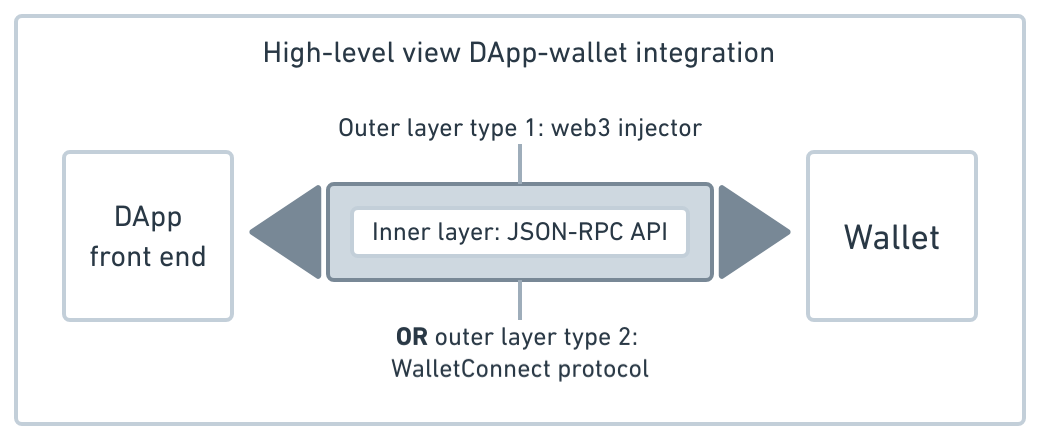
In the inner layer, wallets expose a JSON-RPC API to be consumed by DApps. The message exchange in the inner layer is encapsulated by an external transport protocol. There are two widely used transport protocol options in the web3 industry:
- Web3 injector
- WalletConnect
The web3 injector provides an object (web3 provider) within a JavaScript context of a browser that exposes the wallet’s JSON-RPC API. This approach is used when both wallet and DApp front end run in the browser — specifically, wallet as an extension and DApp front end as a web application. For example, MetaMask connecting to Uniswap web application.
The WalletConnect protocol establishes a session between DApp and wallet to enable secure, remote JSON-RPC message exchange. WalletConnect is used when wallet and DApp front end do not run together within the same browser environment. In this case, wallet and DApp front end may even be running on different devices. For example, Trust Wallet on an iPhone connecting to Uniswap in a browser on a MacBook (both devices operated by the same person).
:::note Hathor wallet integrations Hathor official desktop and mobile wallets expose a JSON-RPC API (inner layer) and use WalletConnect v2 1 as the transport protocol (outer layer). Hathor also supports MetaMask via the Hathor MetaMask Snap, which uses the web3 injector approach instead. This article covers the WalletConnect integration. :::
In the following sections, we detail each layer for Hathor official wallet applications.
Inner layer: JSON-RPC API
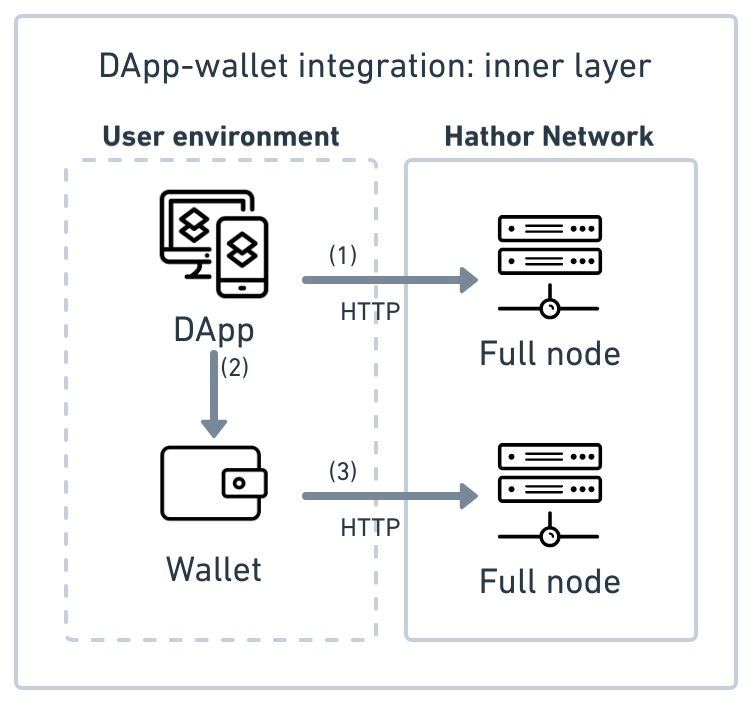
The following diagram presents the inner layer of the integration:
Credits: icons created by rendicon and Ralf Schmitzer from the Noun Project; and smashingstocks from Flaticon.
To load data into the UI, your DApp must read the Hathor blockchain directly. It does this by implementing an HTTP client that connects to a Hathor full node.
:::note Coming from MetaMask? With browser extension wallets like MetaMask, the wallet connects to the network and the DApp accesses that connection through a web3 provider injected in the browser. With WalletConnect, this is different: the DApp establishes its own direct connection to a full node. The wallet also has its own separate connection. Neither shares the other's connection. :::
In summary, the inner layer involves three independent connections:
- DApp → Hathor Network: blockchain reads happen via the full node HTTP API. In practice, most DApps mediate this through a centralized back-end service rather than calling the full node directly from the front end — see DApp architecture for the trade-offs.
- DApp → Wallet: transaction requests go through WalletConnect.
- Wallet → Hathor Network: the wallet maintains its own separate connection to a full node.
Inner layer flow
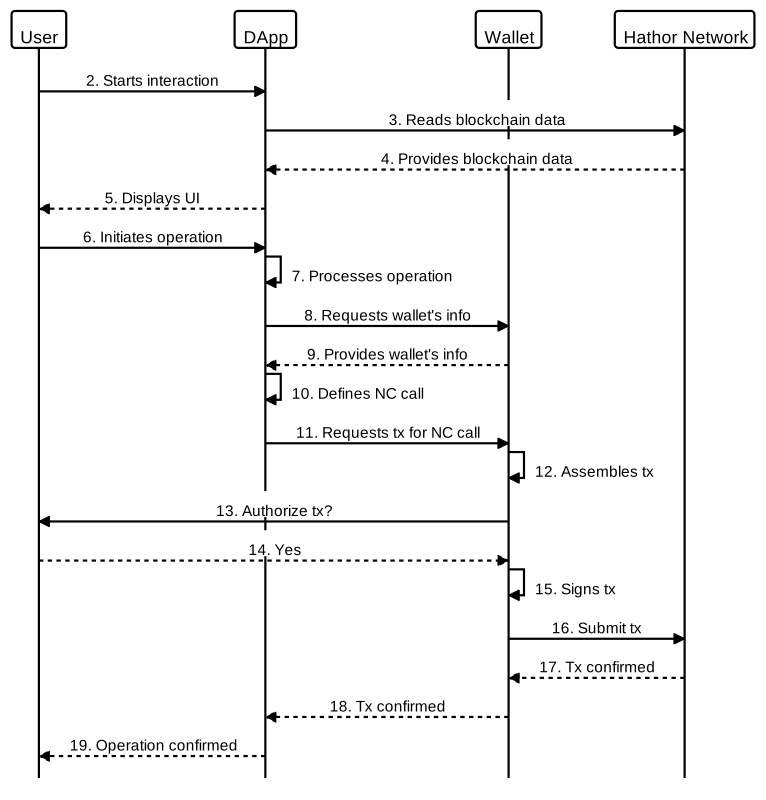
A single user operation typically goes through four phases. A real operation may cycle through the Read and Act phases multiple times before reaching Confirm.
Phase 1 — Connect (once per session)
- DApp and wallet establish a connection at the outer layer (WalletConnect pairing).
Phase 2 — Read (as many times as needed) 2. User interacts with the DApp UI, triggering a need to read blockchain data. 3. DApp sends a read request to its connected full node. 4. Full node responds with the data. 5. DApp UI displays the result to the user.
Phase 3 — Act (per operation) 6. User initiates an operation. 7. DApp starts processing the operation. 8. DApp requests specific data from the wallet — e.g., address, UTXO, balance. 9. Wallet returns the requested data. 10. DApp uses the data to prepare a nano contract call.
Phase 4 — Confirm (per transaction) 11. DApp requests the wallet to create a transaction for the nano contract call. 12. Wallet assembles the raw transaction. 13. Wallet prompts the user to authorize it. 14. User approves. 15. Wallet signs the transaction. 16. Wallet submits the signed transaction to its full node. 17. Full node confirms the transaction and responds to the wallet. 18. Wallet notifies the DApp that the transaction was confirmed. 19. DApp notifies the user that the operation completed successfully.
The following sequence diagram illustrates this flow:
Outer layer: WalletConnect protocol
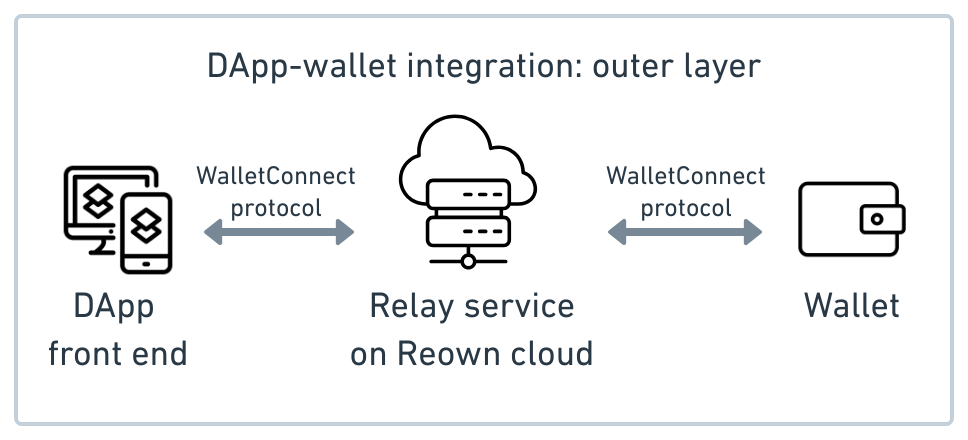
The following diagram presents the outer layer of the integration:
Credits: icons created by rendicon from the Noun Project; and smashingstocks from Flaticon.
The WalletConnect protocol acts as the transport layer for RPC calls, providing a secure communication channel for message exchange. The payload of the exchanged messages consists of JSON-RPC requests/responses. DApp and wallet do not communicate directly. Instead, message exchange is mediated by a relay mechanism following a PubSub (publisher-subscriber) pattern 2.
The only available relay for use with the WalletConnect protocol is the centralized relay service provided by Reown Cloud 3. Communication between DApp and wallet occurs over a secure channel, with messages encrypted using symmetric cryptography based on a shared key between the two.
The communication channel is identified by a unique topic shared exclusively between wallet and DApp. Messages are labeled with this topic, and both DApp and wallet subscribe to listen to it. This setup enables WalletConnect to function as a secure transport layer over websocket protocol.
This establishes a session for message exchange between DApp and wallet. The communication channel remains active for the duration of the session. If the session is terminated or expires, the associated channel is closed, and communication on the corresponding topic ceases.
In summary, establishing a session requires the DApp and wallet to use WalletConnect clients to connect to the relay service provided by Reown Cloud.
Outer layer flow
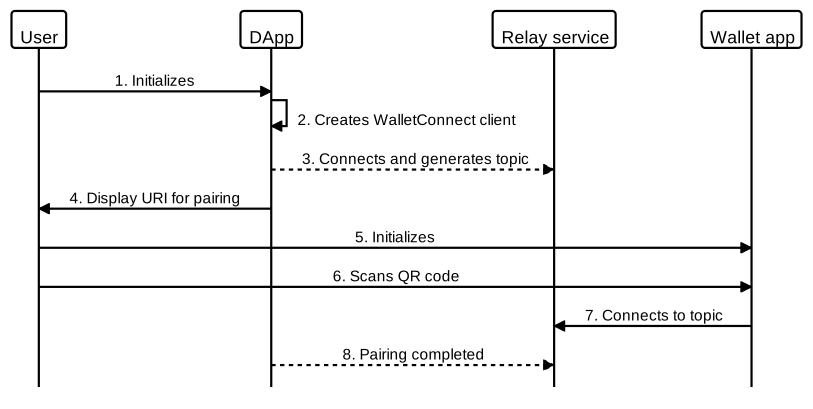
To implement the outer layer integration, developers should consider the following flow:
- User initializes DApp.
- DApp creates a WalletConnect client.
- WalletConnect client connects to Reown Cloud relay service and generates a topic.
- DApp displays the URI (as a QR code and deep link) for pairing with the wallet.
- User initializes Hathor desktop/mobile wallet.
- Using the wallet, user scans the QR code or copies/pastes the deep link.
- Wallet connects to relay service and subscribes to the topic.
- DApp receives a notification that the wallet has paired.
From this point on, the DApp and wallet can exchange messages, with the payload consisting of RPC requests/responses. The following sequence diagram represents this flow:
Key takeaways
| Layer | What it is | What your DApp implements |
|---|---|---|
| Inner | JSON-RPC API exposed by Hathor wallets | Call RPC methods (htr_sendNanoContractTx, htr_getAddress, etc.) to request wallet actions |
| Outer | WalletConnect v2 protocol (Reown) | Use the Reown SDK to establish and maintain the session between your DApp and the wallet |
Two additional things to keep in mind:
- Your DApp reads blockchain data independently — it connects directly to a Hathor full node via HTTP API, not through the wallet.
- The wallet never sends data to your DApp unsolicited — all interactions are DApp-initiated (you request data or a transaction; the wallet responds).
What's next?
DApp-wallet integration development: reference code for implementing this architecture in your DApp using the Reown SDK.